Showing posts with label UDK. Show all posts

Monday, March 31, 2014

Experimenting with Modular Level Design

Recently I found a few useful Maya scripts to assist with level design/environment art. Since I prefer to concept my whole environment in Maya before dealing with the game engine, these scripts are great. They allow me to split my scenes, quickly swap out pieces and export the scene to UDK for testing important things like gameplay and scale.


The scripts are:
Ninja Asset
Ragnarok Exporter

I'm still using UDK until I can upgrade my computer. I hope there's a quick way of getting assets inside Unreal 4 too!


Here's what Ninja Asset looks like. I actually separate my Maya scene into different categories like Architecture, Organics, a folder for WIPs and a folder for kitbash testing scenes.


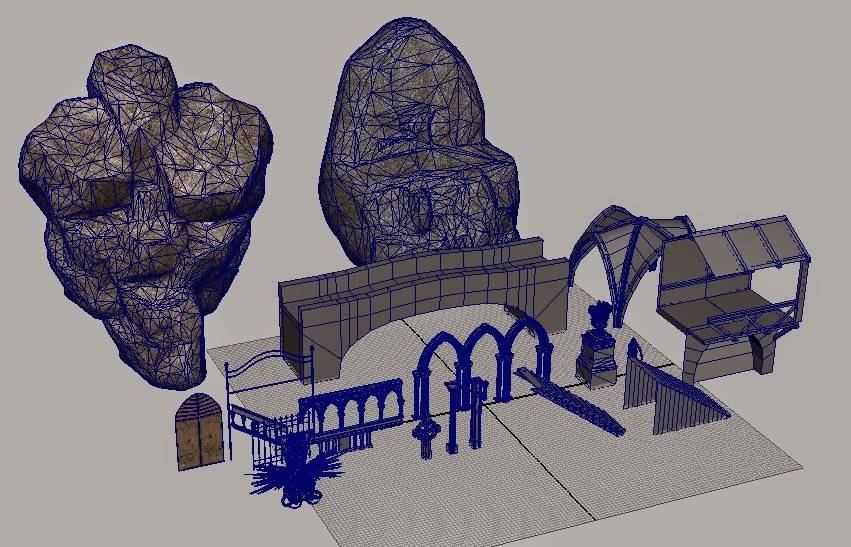
  Here are some of the assets I made for the project so far. Most of them aren't UV'd and the topology is messy, but I'm just testing these ideas out for level design purposes.


The following images are just some of the quick kitbashed scenes I made


Actually this environment is for my thesis film project so it's not thoughtlessly kit-bashed. Brought into UDK and lit with default night lighting. With this technique I find I can explore design a lot quicker than drawing it out actually because it's faster to duplicate a bunch of shapes around than to try getting the perspective correct in the drawings.

The only downside to this method is the results can be limiting depending on the pieces you have in your library, but you can always create more as you go. Since I'm doing this for concepting the pieces aren't all perfectly aligned to the grid either, although I try to align as many modules as possible because it'll probably be less of a headache later.

One things for sure though, I love Maya scripts. What would my life be like without them...


~

Thursday, October 31, 2013

City Hall Concept Art

This is a more updated concept art piece for a the UDK environment I'm creating for the action analysis assignment. Next step is to really get into the 3D aspects.

Polycount thread: http://www.polycount.com/forum/showthread.php?t=127465


Friday, October 11, 2013

Action Analysis Concept Art

This is some concept art for my major project this semester. I didn't get to finish all the designs I wanted, but this is what I have for now. I'll update this post as I finish the rest of the designs.


Sunday, May 19, 2013

UDK Landscape

I was going to wait until I progressed further before posting this, but I just discovered the site https://sketchfab.com/ which lets you upload and view models in the browser. It supports pretty dense files, so I felt like testing with a landscape I've been working on.

 I used these video tutorials from Wenda extensively: https://www.youtube.com/user/wenda111287/videos

This is actually just an experiment to learn some tools, just wait until I begin showing off my two personal projects. But I still have a lot of work to do for them.


Sunday, January 06, 2013

Revolver - Texturing

This is my first time going in-depth texturing hard surfaced objects. On my previous models I sorta cheated by not making proper high/low poly models for the normal maps and polypainting the diffuse map. But this time I did all the steps (that I know of). It took a long time because I encountered a lot of problems, mostly from some mistakes in the modeling stage. I fixed them the best I could and finally I got the gun into UDK without any artifacts! The texturing itself could still use a lot of work (not even finished), but this model served it's purpose teaching me the workflow/ solving common issues so I think it's better to move on (plus I can re-texture whenever I want anyway).

If your computer can support it, here's the model in 3D (uploaded to p3d.in):

Diffuse + Spec + Normal Maps + model in Maya Viewport 2.0:


Wireframe:


Working in UDK:

Tuesday, March 27, 2012

Novel Interior - Dracula

Here is the sorta finished painting for the novel interior sketch a few posts ago.


I also started making the environment in 3D. First I created a temp environment in UDK using their custom meshes to figure out the scale. Slowing I'm creating my own custom meshes in Maya and I will import them into UDK. First real attempt at 3D environment art, whoo!


Tuesday, March 06, 2012

Unreal

I played with UDK some more during reading week. This map is based a little on a video tutorial series from 3DBuzz, but I went a bit overkill with emitters, sound effects and DoF, haha. The videos were great, I think if I had the time I know enough to create a badass level. The next step for me is to learn modeling&texturing static meshes which will take way more time to learn than UDK.

This sure beats the hell out of animating!

All the assets used in this map were from the UDK kit, none created by me.